Yubico Forum
https://forum.yubico.com/

[SOLVED] Enable OTP+CCID+U2F on Yubikey-NEO 3.3.0
https://forum.yubico.com/viewtopic.php?f=26&t=1698
Page 2 of 2

Author:  ChrisHalos [ Fri Jan 16, 2015 12:31 am ]
Post subject:  Re: [QUESTION] Enable OTP+CCID+U2F on Yubikey-NEO 3.3.0

Hey All -

For anyone experiencing this issue, did you set a configuration access code through the Personalization Tool application (i.e. "Configuration Protection")? If so, please remove it. The configuration access code prohibits you from reprogramming the key - that includes mode switching.

Regards,
Chris
Yubico Support

Author:  camorgan21 [ Fri Jan 16, 2015 12:36 am ]
Post subject:  Re: [QUESTION] Enable OTP+CCID+U2F on Yubikey-NEO 3.3.0

ChrisHalos wrote:
Hey All -

For anyone experiencing this issue, did you set a configuration access code through the Personalization Tool application (i.e. "Configuration Protection")? If so, please remove it. The configuration access code prohibits you from reprogramming the key - that includes mode switching.

Regards,
Chris
Yubico Support


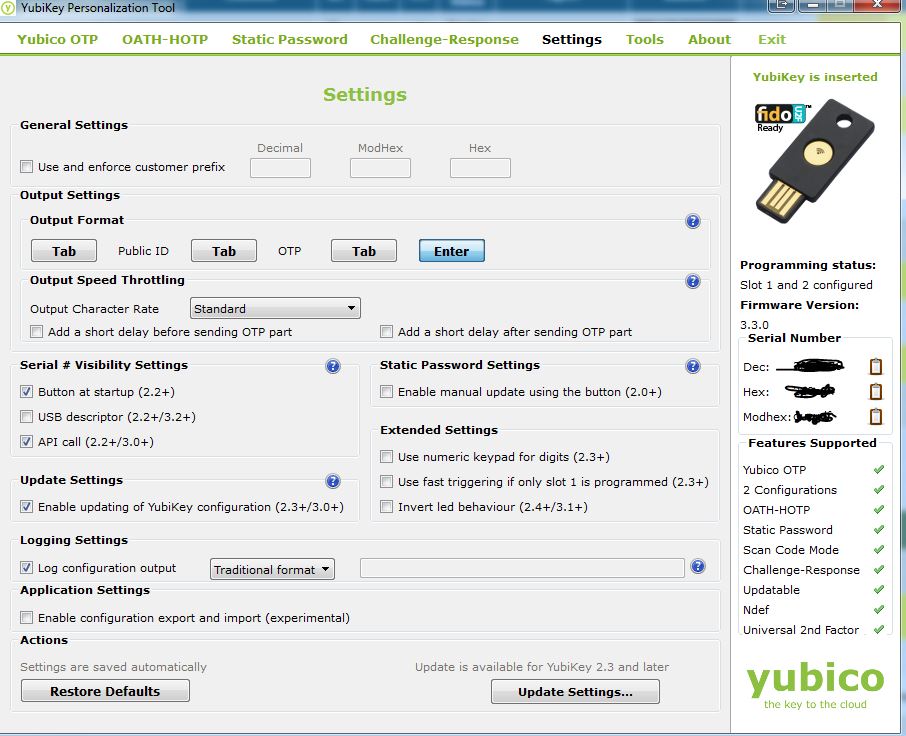
How do I know if this is setup on my Yubikey or not? I don't ever remember setting this up, and if I did how do I remove it?

Thanks,

Cody

Attachments:
Yubikey NEO Personalization Tool.JPG
Yubikey NEO Personalization Tool.JPG [ 125.26 KiB | Viewed 2362 times ]

Author:  ChrisHalos [ Fri Jan 16, 2015 1:04 am ]
Post subject:  Re: [QUESTION] Enable OTP+CCID+U2F on Yubikey-NEO 3.3.0

What I usually key off of is this:

If you notice that you are clicking to enable/disable a mode with the NEO Manager, then you click "OK" and nothing happens, it's likely configuration protection is enabled. After clicking OK, you should be instructed to unplug and reinsert your key (if configuration protection is disabled and the tool is working properly).

Removing configuration protection from the Personalization Tool:

1) On the "Settings" screen, click on the "Update Settings..." button at the bottom right.

2) Under "Configuration Protection", it'll show "YubiKey(s) unprotected - Enable Protection" regardless of whether you've set an access code or not (unfortunately). If you think it's enabled, click on the dropdown arrow and select "YubiKey(s) protected - Disable Protection".

3) It'll ask for the "Current Access Code". The most commonly used option is "Use serial number", which is five 0's followed by your 7 digit serial number. Enter in the access code, or click "use serial number" to automatically complete the field (if that's what you did initially).

4) Select a configuration slot

5) Click on the "Update" button. As long as you get the error message at the top of the Personalization Tool, you should go back to the NEO Manager and test the mode switch again.

Regards,
Chris

Author:  camorgan21 [ Fri Jan 16, 2015 3:36 am ]
Post subject:  Re: [QUESTION] Enable OTP+CCID+U2F on Yubikey-NEO 3.3.0

Thank you ChrisHalos, these steps resolved the issue I was having!

I have updated the subject/title of this post to [SOLVED].

Thank you,

Cody

Author:  devx [ Mon Feb 23, 2015 5:11 pm ]
Post subject:  Re: [SOLVED] Enable OTP+CCID+U2F on Yubikey-NEO 3.3.0

I also have the same problem, I as well just submited a ticket to support. On a side note mode 2 (aka -m82) works just fine. Not sure what the issues is. I have emailed support and I will update the thread once I have more information.


-Victor

Author:  DanTheColoradan [ Sat Apr 04, 2015 8:26 pm ]
Post subject:  Re: [QUESTION] Enable OTP+CCID+U2F on Yubikey-NEO 3.3.0

ChrisHalos wrote:
Hey All -

For anyone experiencing this issue, did you set a configuration access code through the Personalization Tool application (i.e. "Configuration Protection")? If so, please remove it. The configuration access code prohibits you from reprogramming the key - that includes mode switching.

Regards,
Chris
Yubico Support


This helped me with my NEO-n. I think a better error code would be helpful. Perhaps:

"Yubikey core error: write error - is your card protected by a pin?"

Daniel

Page 2 of 2 All times are UTC + 1 hour
Powered by phpBB® Forum Software © phpBB Group
https://www.phpbb.com/