Yubico Forum
https://forum.yubico.com/

Windows 8.1 not recognising NEO as HID device
https://forum.yubico.com/viewtopic.php?f=26&t=1167
Page 2 of 3

Author:  Tom [ Mon Oct 28, 2013 6:29 pm ]
Post subject:  Re: Windows 8.1 not recognising NEO as HID device

download the binaries for windows here
http://opensource.yubico.com/yubikey-pe ... eases.html

and then just open a CMD and type ykpersonalize.exe -m82

remove the neo and plug it back in

Author:  Fin1 [ Tue Oct 29, 2013 9:48 am ]
Post subject:  Re: Windows 8.1 not recognising NEO as HID device

Sorry for having to use a different username, I reset my Yubikey (and have to use a hub now)

Here's what I have done:

1. Downloaded the ykpersonalize tool at http://yubico.github.io/yubikey-persona ... eases.html

2. Unzipped it

3. Win+R to open Run, typed CMD to open a Command Prompt

4. Then typed the the full path to the ykpersonalize file followed by -m82 C:\Users\My Name\Downloads\ykpers-1.14.1-win64\bin\ykpersonalize -m82

5. Typed y when prompted

4. Unpluged the Yubikey NEO (from the hub)

6. Reinserted the Yubikey NEO (into the hub)

7. The light is lit on the Yubikey (when attached by the hub)

8. Inserting the Yubikey straight into the PC (without a hub), the light doesn't come on and nothing happens. How can I confirm I have set the mode to -m82?

Attachments:
File comment: Path entered to activate -m82 mode
1.jpg
1.jpg [ 30.85 KiB | Viewed 6541 times ]

Author:  charliee [ Fri Jan 31, 2014 12:10 am ]
Post subject:  Re: Windows 8.1 not recognising NEO as HID device

So... anyone found a solution to this problem?

I just tried doing the 8.1 upgrade again, hoping that perhaps a patch or driver upgrade from Microsoft had trickled through and would resolve the issue - no luck.

So far I've tried:
  1. removing everything under USB in Device Manager
  2. setting NEO to -m82
  3. Installing chipset drivers
  4. Installing a keyboard filter driver from the manufacturer
  5. Removing and re-installing the NEO drivers (multiple times)

None have helped, I still get the following (and the Yubikey is not lit):
Code:
Microsoft USBccid Smartcard Reader (WUDF)

The device cannot start. (Code 10)

{Operation Failed}
The requested operation was unsuccessful.

Author:  Tom [ Fri Jan 31, 2014 11:01 am ]
Post subject:  Re: Windows 8.1 not recognising NEO as HID device

charliee wrote:
So... anyone found a solution to this problem?


Do you have virtual machines players installed?

Please try the following:

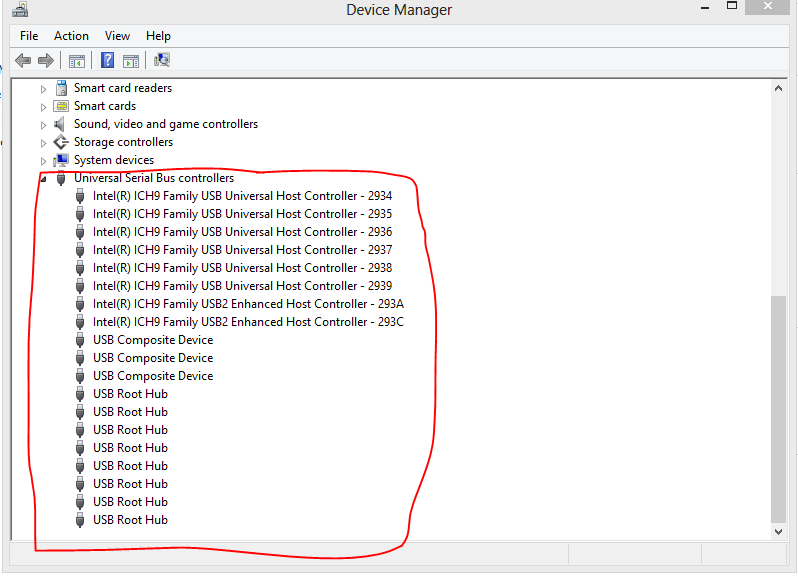
Uninstall all drivers under the USB bus in the device manager and reboot the windows 8 machine.

Attachments:
Capture (1).PNG
Capture (1).PNG [ 45.88 KiB | Viewed 6439 times ]

Author:  charliee [ Thu Feb 06, 2014 1:03 am ]
Post subject:  Re: Windows 8.1 not recognising NEO as HID device

Definitely no virtualisation software installed.

I've tried removing all USB devices again - same result. Yubikey re-installs as a Microsoft smartcard with Error 10, cannot start.

Any other ideas?

Author:  AlanI [ Thu Feb 13, 2014 2:05 pm ]
Post subject:  Re: Windows 8.1 not recognising NEO as HID device

I've got the exact same problem.

I've got three Windows 8.1 computers, it works fine on two of them, but refuses to work on the third.

Device manager shows it as 'Microsoft USBccid Smartcard Reader' and 'The device cannot start.'

When I plug it into the problem computer, the green light on the Neo turns solid green (i.e. indicating it's working and ready to generate codes), however when you press the button the green light immediately turns of completely without sending anything to the computer (well, any text anyway).

The light remains off until you unplug it from the computer, and plug it back in again at which point the entire process repeats itself.

I've tried removing all USB bus drivers and rebooting as suggested, but it's still doing the same thing.

When you plug it in for the first time without drivers, the Windows 'installing new device' window pops up and identifies it as 'Yubikey NEO CCID'.

I tried changing mode to 82, and it sorta worked? I changed to 82 on another computer, booted up the problematic computer and plugged in the key. This time, two 'installing new device' windows came up, one talking about a Yubikey keyboard, and the other about a Yubikey smartcard (I think, I'm going from memory as they were only on the screen for a second). Once that completed, it actually worked. I was able to press the button and it spit out the code as expected.

HOWEVER, just to test it was completely working, I turned the computer off and back on again, and tried it again -- and it went back into broken. The 'Installing new device' went back to 'Yubikey NEO CCID' and didn't configure itself correctly. I've not been able to recreate my short-lived success again.

So, long story short, I have no idea what's going on. Any ideas?

Side note: What's the default mode for the Neo? Should I change it back to whatever it was before I changed it to 82?

EDIT: Also, no virtualisation software here either.

Author:  Tom [ Thu Feb 13, 2014 4:53 pm ]
Post subject:  Re: Windows 8.1 not recognising NEO as HID device

Hello,

can you all state:

Computer Brand, Laptop model, motherboard manufacturer and if you updated with the latest USB driver available at your manufacturer website? (Usually is NEC btw)

Author:  charliee [ Sat Feb 15, 2014 12:03 am ]
Post subject:  Re: Windows 8.1 not recognising NEO as HID device

Tom wrote:
Hello,

can you all state:

Computer Brand, Laptop model, motherboard manufacturer and if you updated with the latest USB driver available at your manufacturer website? (Usually is NEC btw)


Asus UL20A (rev 1.0), CPU SU7300, NB Intel GS45, SB Intel 82801M (ICH9-M). My USB drivers are all the default Windows 8.1 versions for Intel ICH9:

Code:
Intel(R) ICH9 Family USB2 Enhanced Host Controller - 293A

Driver Provider: Microsoft
Driver Date: 21/06/2006
Driver Version: 6.3.9600.16384
Digital Signer: Microsoft Windows

VEN_8086&DEV_293A

Author:  AlanI [ Thu Feb 20, 2014 1:04 pm ]
Post subject:  Re: Windows 8.1 not recognising NEO as HID device

To respond to Tim's question of details of the computer I'm having the trouble with: It's a HP EliteBook 2740p (Intel QM57 chipset). USB ports appear to be Intel 5 Series / 3400 chipset. I used Intel's INF update utility, so it's either using them or the built in Windows 8.1 ones. I'm not aware of any later USB drivers (none listed on HP's site anyway).

[I apologize for the delay in my response, ironically I was unable to reply because to login to this forum it requires your Yubikey to be present, and since it wasn't working on this computer I couldn't easily login to reply]

Author:  charliee [ Thu Mar 06, 2014 1:45 am ]
Post subject:  Re: Windows 8.1 not recognising NEO as HID device

So... any news on a fix for this? Or am I restoring back to 8.0 again?

Page 2 of 3 All times are UTC + 1 hour
Powered by phpBB® Forum Software © phpBB Group
https://www.phpbb.com/