<?xml version="1.0" encoding="UTF-8"?>
<feed xmlns="http://www.w3.org/2005/Atom" xml:lang="en-gb">
<link rel="self" type="application/atom+xml" href="https://forum.yubico.com/feed.php?f=16&amp;t=961" />

<title>Yubico Forum</title>
<subtitle>...visit our web-store at</subtitle>
<link href="https://forum.yubico.com/index.php" />
<updated>2014-05-14T09:16:42+01:00</updated>

<author><name><![CDATA[Yubico Forum]]></name></author>
<id>https://forum.yubico.com/feed.php?f=16&amp;t=961</id>
<entry>
<author><name><![CDATA[frakri]]></name></author>
<updated>2014-05-14T09:16:42+01:00</updated>
<published>2014-05-14T09:16:42+01:00</published>
<id>https://forum.yubico.com/viewtopic.php?t=961&amp;p=5261#p5261</id>
<link href="https://forum.yubico.com/viewtopic.php?t=961&amp;p=5261#p5261"/>
<title type="html"><![CDATA[Re: [HOW TO] - Configure Yubikey VIP for LastPass]]></title>

<content type="html" xml:base="https://forum.yubico.com/viewtopic.php?t=961&amp;p=5261#p5261"><![CDATA[
Had not Enabled YubiKey<p>Statistics: Posted by <a href="https://forum.yubico.com/memberlist.php?mode=viewprofile&amp;u=2889">frakri</a> — Wed May 14, 2014 9:16 am</p><hr />
]]></content>
</entry>
<entry>
<author><name><![CDATA[Tom]]></name></author>
<updated>2014-05-14T09:07:10+01:00</updated>
<published>2014-05-14T09:07:10+01:00</published>
<id>https://forum.yubico.com/viewtopic.php?t=961&amp;p=5259#p5259</id>
<link href="https://forum.yubico.com/viewtopic.php?t=961&amp;p=5259#p5259"/>
<title type="html"><![CDATA[Re: [HOW TO] - Configure Yubikey VIP for LastPass]]></title>

<content type="html" xml:base="https://forum.yubico.com/viewtopic.php?t=961&amp;p=5259#p5259"><![CDATA[
Please share you solution as it may help others. This is the purpose of open questions and open community.<br /><br />Tom.<p>Statistics: Posted by <a href="https://forum.yubico.com/memberlist.php?mode=viewprofile&amp;u=2195">Tom</a> — Wed May 14, 2014 9:07 am</p><hr />
]]></content>
</entry>
<entry>
<author><name><![CDATA[frakri]]></name></author>
<updated>2014-05-14T08:56:17+01:00</updated>
<published>2014-05-14T08:56:17+01:00</published>
<id>https://forum.yubico.com/viewtopic.php?t=961&amp;p=5258#p5258</id>
<link href="https://forum.yubico.com/viewtopic.php?t=961&amp;p=5258#p5258"/>
<title type="html"><![CDATA[Re: [HOW TO] - Configure Yubikey VIP for LastPass]]></title>

<content type="html" xml:base="https://forum.yubico.com/viewtopic.php?t=961&amp;p=5258#p5258"><![CDATA[
Found the problem and solved <img src="https://forum.yubico.com/images/smilies/icon_neutral.gif" alt=":|" title="Neutral" /><p>Statistics: Posted by <a href="https://forum.yubico.com/memberlist.php?mode=viewprofile&amp;u=2889">frakri</a> — Wed May 14, 2014 8:56 am</p><hr />
]]></content>
</entry>
<entry>
<author><name><![CDATA[Tom]]></name></author>
<updated>2014-05-14T07:16:38+01:00</updated>
<published>2014-05-14T07:16:38+01:00</published>
<id>https://forum.yubico.com/viewtopic.php?t=961&amp;p=5257#p5257</id>
<link href="https://forum.yubico.com/viewtopic.php?t=961&amp;p=5257#p5257"/>
<title type="html"><![CDATA[Re: [HOW TO] - Configure Yubikey VIP for LastPass]]></title>

<content type="html" xml:base="https://forum.yubico.com/viewtopic.php?t=961&amp;p=5257#p5257"><![CDATA[
Which keyboard layout are you using?<br /><br />Also provide screenshot from your real config not the tutorial.<br /><br />Thanks.<p>Statistics: Posted by <a href="https://forum.yubico.com/memberlist.php?mode=viewprofile&amp;u=2195">Tom</a> — Wed May 14, 2014 7:16 am</p><hr />
]]></content>
</entry>
<entry>
<author><name><![CDATA[frakri]]></name></author>
<updated>2014-05-13T18:12:05+01:00</updated>
<published>2014-05-13T18:12:05+01:00</published>
<id>https://forum.yubico.com/viewtopic.php?t=961&amp;p=5256#p5256</id>
<link href="https://forum.yubico.com/viewtopic.php?t=961&amp;p=5256#p5256"/>
<title type="html"><![CDATA[Re: [HOW TO] - Configure Yubikey VIP for LastPass]]></title>

<content type="html" xml:base="https://forum.yubico.com/viewtopic.php?t=961&amp;p=5256#p5256"><![CDATA[
<div class="quotetitle">Tom wrote:</div><div class="quotecontent"><br /><strong>Summary</strong> <br /><br />- <span style="text-decoration: underline">Requirement</span>: Yubikey VIP and the cross-platform personalization tool. Please always download latest version of the cross-platform tool from here:<br /><a href="http://www.yubico.com/products/services-software/personalization-tools/use/" class="postlink">http://www.yubico.com/products/services-software/personalization-tools/use/</a><br /><br />- <span style="text-decoration: underline">Description</span>: This short how-to will describe how to configure the Yubikey VIP to work with LastPass.<br /><br /><br /><br /><strong>STEP 1:</strong><br /><br />Plug your YubiKey VIP inside your USB port of your computer. Check that the YubiKey led turns on. It is a tiny green light in the middle of the golden disk on the upside of your Yubikey VIP.<br /><br /><strong>STEP 2:</strong><br /><br />Run the cross-platform personalization tool. Please always use the up-to-date version of the cross platform tool available here: <a href="http://www.yubico.com/products/services-software/personalization-tools/use/" class="postlink">http://www.yubico.com/products/services-software/personalization-tools/use/</a><br /><br /><strong>STEP 3:</strong><br /><br />- Select the<strong> Yubico OTP </strong>in the top left corner of the tool interface<br /><br /><img src="http://forum.yubico.com/images/myImages/VIP_howto/VIP1.png" alt="Image" /><br /><br /><br /><br /><br />- Select <strong>QUICK</strong> configuration tool in the next screen<br /><br /><img src="http://forum.yubico.com/images/myImages/VIP_howto/VIP3.png" alt="Image" /><br /><br /><br /><br /><br /><br /><br />- <strong>Select configuration slot 2</strong> This is very important! If you will select configuration slot 1 you will overwrite your Symantec Credentials!<br />- Press the <strong>WRITE</strong> button in the bottom left corner of the interface<br /><br /><br /><img src="http://forum.yubico.com/images/myImages/VIP_howto/VIP2.png" alt="Image" /><br /><br /><br /><br /><strong>STEP 4:</strong><br /><br />The last step is to follow the LastPass tutorial for configuring the Yubikey with the LastPass software.<br />This steps are very simple and are described here:<br /><br /><a href="http://helpdesk.lastpass.com/security-options/yubikey-authentication/" class="postlink">http://helpdesk.lastpass.com/security-options/yubikey-authentication/</a><br /></div><br /><br /><br />I get this when i try to upload :<br /><br />OTP prefix mismatch, might be due to keyboard layout<p>Statistics: Posted by <a href="https://forum.yubico.com/memberlist.php?mode=viewprofile&amp;u=2889">frakri</a> — Tue May 13, 2014 6:12 pm</p><hr />
]]></content>
</entry>
<entry>
<author><name><![CDATA[Tom]]></name></author>
<updated>2013-02-20T11:29:02+01:00</updated>
<published>2013-02-20T11:29:02+01:00</published>
<id>https://forum.yubico.com/viewtopic.php?t=961&amp;p=3613#p3613</id>
<link href="https://forum.yubico.com/viewtopic.php?t=961&amp;p=3613#p3613"/>
<title type="html"><![CDATA[[HOW TO] - Configure Yubikey VIP for LastPass]]></title>

<content type="html" xml:base="https://forum.yubico.com/viewtopic.php?t=961&amp;p=3613#p3613"><![CDATA[
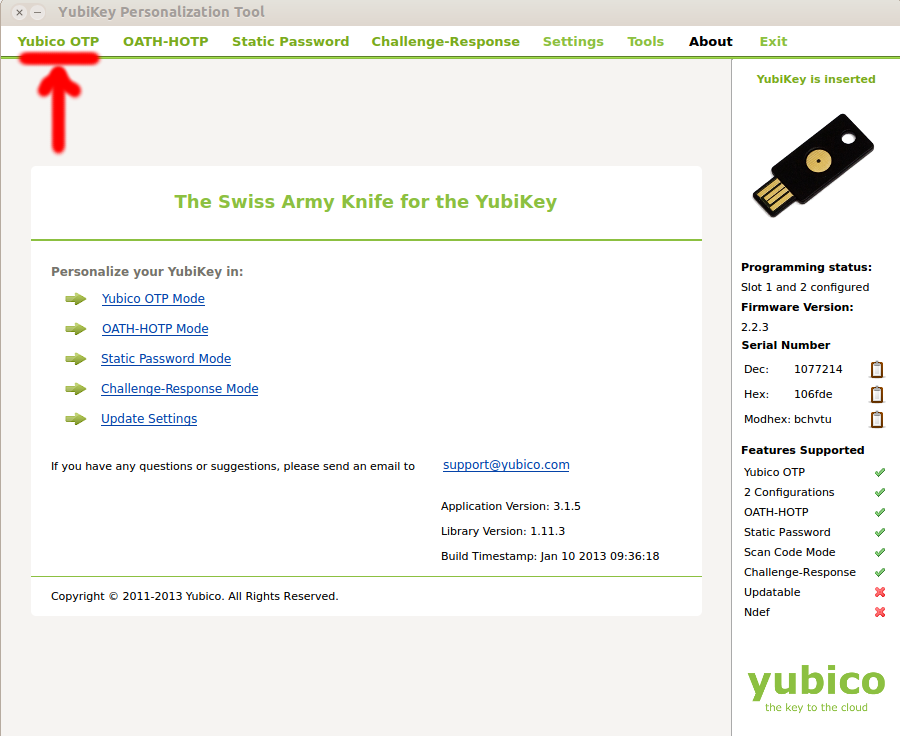
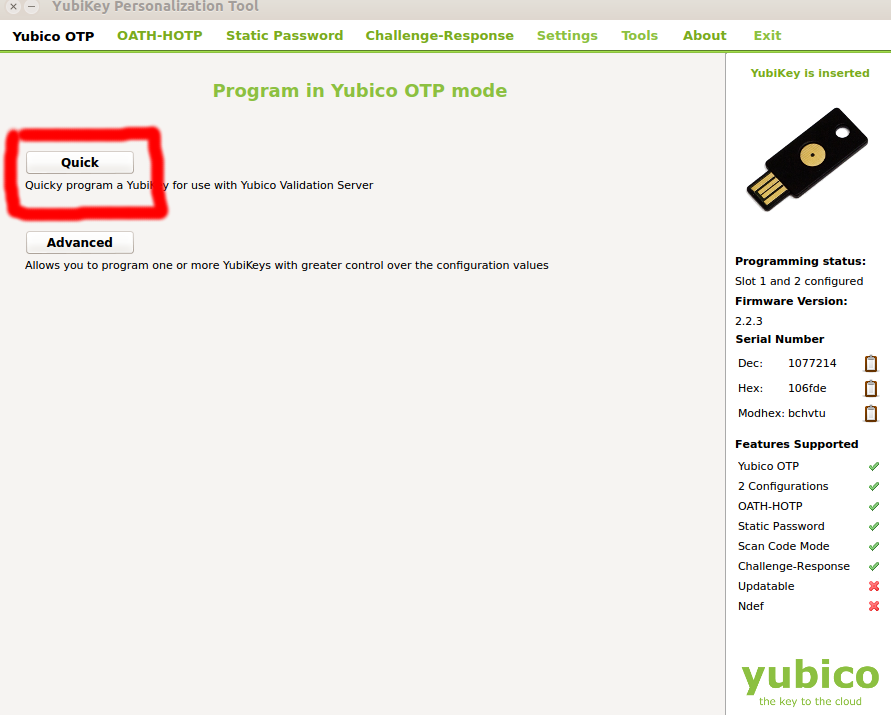
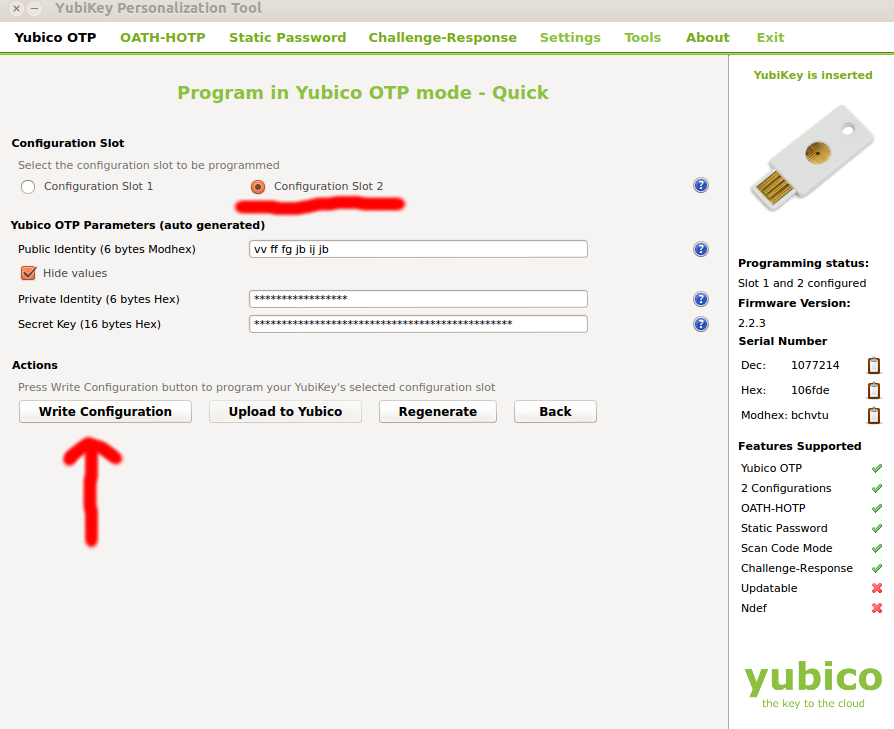
<strong>Summary</strong> <br /><br />- <span style="text-decoration: underline">Requirement</span>: Yubikey VIP and the cross-platform personalization tool. Please always download latest version of the cross-platform tool from here:<br /><a href="http://www.yubico.com/products/services-software/personalization-tools/use/" class="postlink">http://www.yubico.com/products/services-software/personalization-tools/use/</a><br /><br />- <span style="text-decoration: underline">Description</span>: This short how-to will describe how to configure the Yubikey VIP to work with LastPass.<br /><br /><br /><br /><strong>STEP 1:</strong><br /><br />Plug your YubiKey VIP inside your USB port of your computer. Check that the YubiKey led turns on. It is a tiny green light in the middle of the golden disk on the upside of your Yubikey VIP.<br /><br /><strong>STEP 2:</strong><br /><br />Run the cross-platform personalization tool. Please always use the up-to-date version of the cross platform tool available here: <a href="http://www.yubico.com/products/services-software/personalization-tools/use/" class="postlink">http://www.yubico.com/products/services-software/personalization-tools/use/</a><br /><br /><strong>STEP 3:</strong><br /><br />- Select the<strong> Yubico OTP </strong>in the top left corner of the tool interface<br /><br /><img src="http://forum.yubico.com/images/myImages/VIP_howto/VIP1.png" alt="Image" /><br /><br /><br /><br /><br />- Select <strong>QUICK</strong> configuration tool in the next screen<br /><br /><img src="http://forum.yubico.com/images/myImages/VIP_howto/VIP3.png" alt="Image" /><br /><br /><br /><br /><br /><br /><br />- <strong>Select configuration slot 2</strong> This is very important! If you will select configuration slot 1 you will overwrite your Symantec Credentials!<br />- Press the <strong>WRITE</strong> button in the bottom left corner of the interface<br /><br /><br /><img src="http://forum.yubico.com/images/myImages/VIP_howto/VIP2.png" alt="Image" /><br /><br /><br /><br /><strong>STEP 4:</strong><br /><br />The last step is to follow the LastPass tutorial for configuring the Yubikey with the LastPass software.<br />This steps are very simple and are described here:<br /><br /><a href="http://helpdesk.lastpass.com/security-options/yubikey-authentication/" class="postlink">http://helpdesk.lastpass.com/security-options/yubikey-authentication/</a><p>Statistics: Posted by <a href="https://forum.yubico.com/memberlist.php?mode=viewprofile&amp;u=2195">Tom</a> — Wed Feb 20, 2013 11:29 am</p><hr />
]]></content>
</entry>
</feed>